

BYOC Cloud billing on your invoice
Bring Your Own Carrier (BYOC) allows you to connect your own telephony provider into Genesys Cloud while still using Genesys for your AI-powered experience orchestration platform. Because this process involves call traffic, usage charges can apply. Sometimes those charges affect your invoice, which appears differently than your services order. This guide helps you understand those differences.
Step 1: Determine your fair use allowance
Every BYOC Cloud subscription comes with a monthly allowance of minutes, based on license type and number of users.
For example, a Genesys Cloud customer’s subscription includes:
- 1,000 Communicate licenses
- 1,500 Genesys Cloud CX 3 licenses (named)
From the Genesys Cloud fair use policy, the following number of minutes are included with a Named license:
- Communicate = 1,000 minutes per license per month
- CX3 = 5,000 minutes per license per month
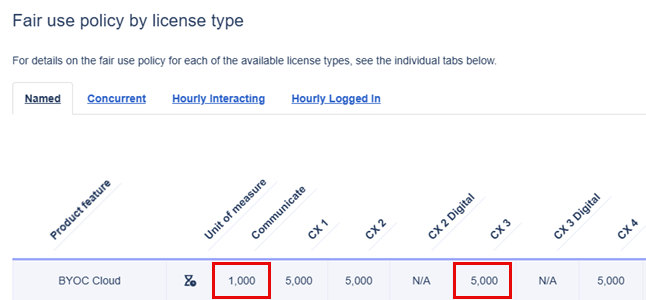
Now, calculate the fair use allowance. Based on the example, the allowance calculation is:
- 1,000 Communicate licenses × 1,000 fair use minutes per license = 1,000,000 minutes
- 1,500 Genesys Cloud CX 3 licenses (Named) × 5,000 fair use minutes per licenses = 7,500,000 minutes
- Total allowance: 1,000,000 + 7,500,000 = 8,500,000 minutes per month
The total allowance is the number of minutes included each month before any BYOC overage charges apply. If you use more minutes than this allotment in a specified month, you are billed for the overage amount in your next monthly invoice.
Step 2: Review actual usage
For instructions about how to access your usage report, see View your billing and usage summary.
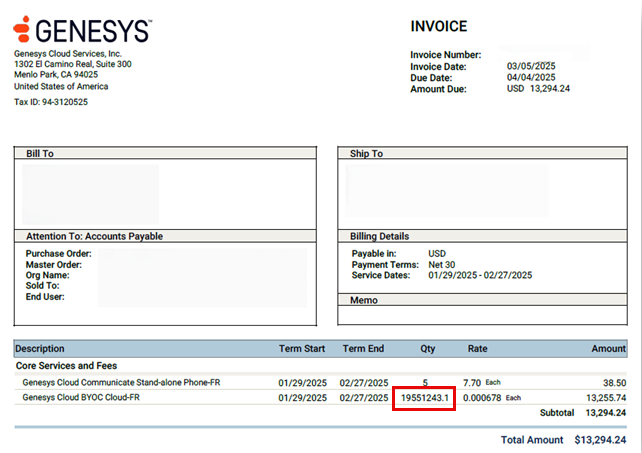
Step 3: Compare usage to allowance
The next step is to compare the usage against the allowance.
- Usage: 19,551,243.1 minutes (from Step 2)
- Allowance: 8,500,000 minutes (from Step 1)
- Overage: 19,551,243.1–8,500,000 = 11,051,243.1 billable minutes
Step 4: Apply the overage rate
After you know the number of minutes for which to be billed, you can look up the rate per overage minute. For more information, see Genesys Cloud fair use policy. For this customer, who is billed in USD, the overage rate is $0.00120 per minute.
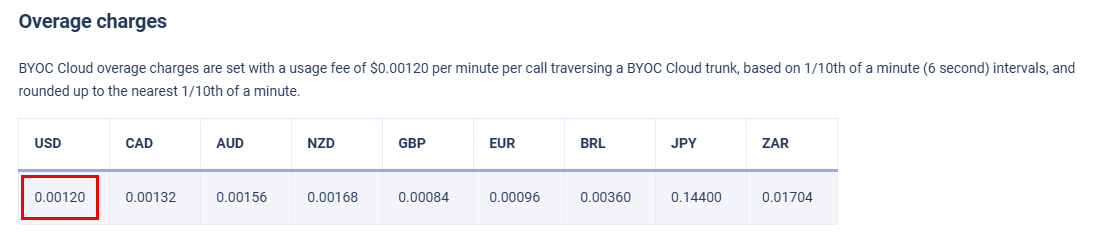
Now that you know the rate per minute, calculate the overage charges on your invoice:
- Billable minutes: 11,051,243.1 (from Step 3)
- Rate per minute: $0.00120 (from Step 4)
- Overage amount: 11,051,243.1 x $0.00120 = $13,255.74
Step 5: View the invoice
The invoice does not display the published overage rate ($0.00120). Instead, it takes the total overage dollar amount and spreads it across all minutes used (not just the minutes above fair use).
- Overage amount: $13,255.74 (from Step 4)
- Total minutes used: 19,551,243.1 (from Step 2)
- Invoice rate: $13,255.74 ÷ 19,551,243.1 = $0.000678 each
This per-minute rate appears in the Core Services and Fees section of the invoice, under BYOC Cloud.

Key takeaways
- Core Services and Fees always show your contracted license charges.
- Overage charges only appear when usage exceeds your allowance.
- Overages are billed monthly in arrears, even if your subscription is annual.
- The per-minute rate on your invoice is the overage amount divided by total usage, which is why it looks different from your services order or the Fair Use Policy.
Even though your invoice can look different at first glance, the charges always reconcile back to your usage report and the Genesys Cloud fair use policy.
Still have questions?
The bottom of your invoice includes links to the Genesys Fair Use Policy and Genesys Cloud billing resources. These articles explain in detail how allowances and overages are calculated so that you can verify your charges at any time.
You can also contact the Genesys billing team at ask.finance@genesys.com.
