Record a Communicate call
Prerequisites
- Communicate – User default role
- Conversation > Call > Record permission
- A selected phone
Record calls in progress and listen to them from your inbox or from Documents.
Note: This article describes only how a user can record Communicate calls. Communicate calls are calls that are unrelated to queues and interactions. This article is not about voice interaction recording or BYOC trunk-level recording.
- For more information about recording voice interactions related to queues, see Create a policy.
- For more information about recording at the BYOC external trunk level, see Recording under Media in External trunk settings.
- When a call is in progress, click Expand and select Record.
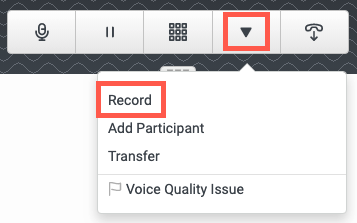
- To stop recording, from the same menu, select Stop Recording or end the call.
- Listen to the recording in your inbox or in your workspace in Documents.